Same engine as SERP Checker
Not a separate engine, same crawler, same reliability, only the way you receive results differs.


SERP API is the raw-data side of SERP Checker: same crawler, same pricing, the only difference is JSON output instead of a dashboard. Call POST /serp-api/trigger, then get the result via webhook or GET by snapshot_id.
Auth header: X-API-KEY. Generate and rotate keys right in the dashboard.
Call POST /serp-api/trigger, with an Idempotency-Key header so a retry after a network error is safe.
curl -X POST https://app.serpupdate.com/api/v1/serp-api/trigger \
  -H "X-API-KEY: 3f9a1c7e4b2d48a6915e0c83d7f6b214" \
  -H "Content-Type: application/json" \
  -H "Idempotency-Key: order-8841" \
  -d '{
    "input": [{
      "keyword": "best protein powder for muscle gain",
      "language": "en",
      "country": "US",
      "device": "desktop",
      "start_page": 1,
      "end_page": 10,
      "include_aio": true
    }]
  }'
Response:
{ "snapshot_id": "sd_abc123xyz" }Call GET /serp-api/{snapshot_id}: 200 when ready, 202 while running, 404 when not found, 410 when expired, 422 when the crawl failed.
curl https://app.serpupdate.com/api/v1/serp-api/sd_abc123xyz \
-H "X-API-KEY: 3f9a1c7e4b2d48a6915e0c83d7f6b214"aio_text and aio_reference only appear when include_aio is on and Google actually showed an AI Overview for that query.
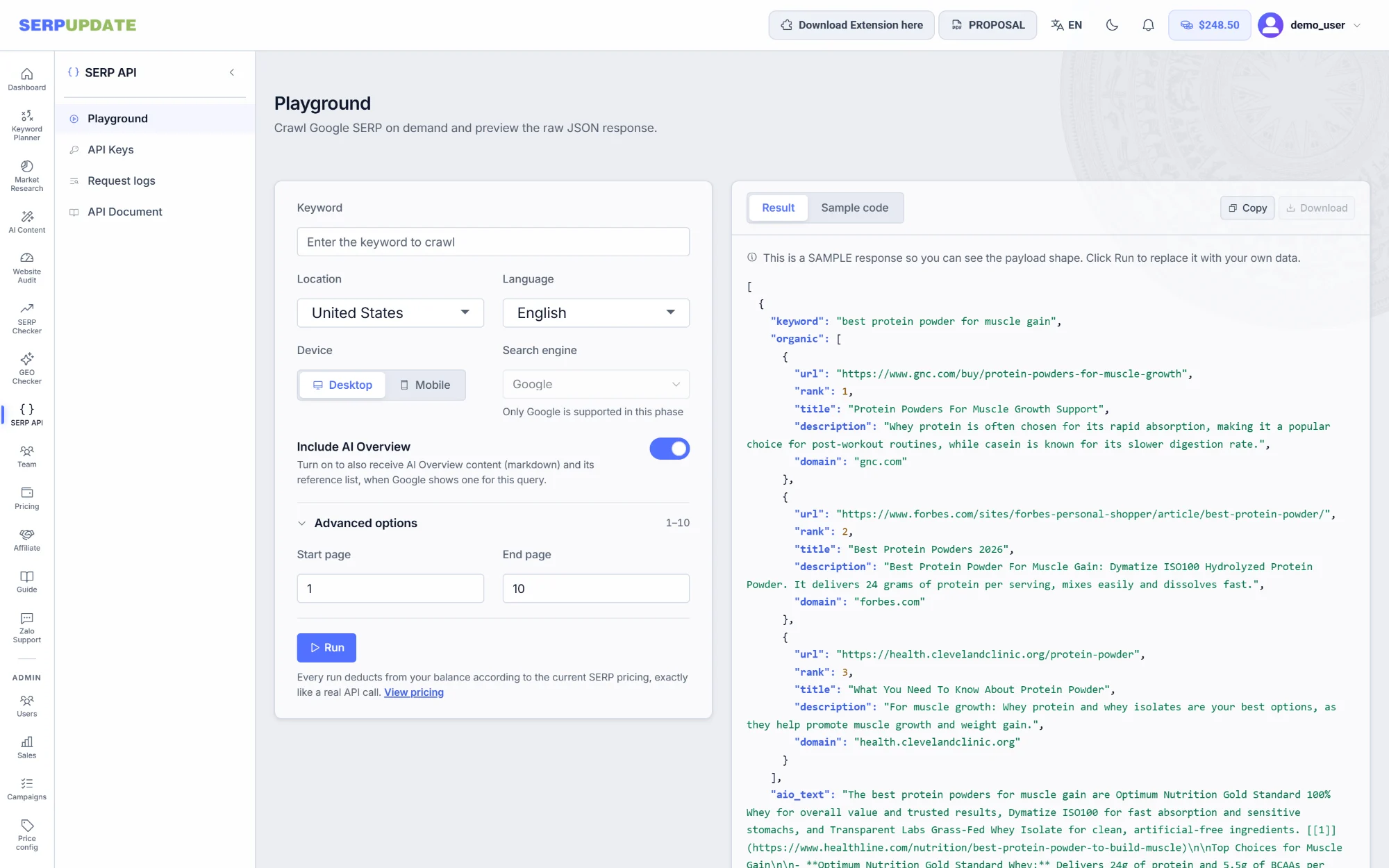
[{
  "keyword": "best protein powder for muscle gain",
  "organic": [
    { "rank": 1, "title": "...", "url": "...", "domain": "gnc.com", "description": "..." }
  ],
  "aio_text": "markdown, only when include_aio is true",
  "aio_reference": [
    { "rank": 1, "url": "...", "domain": "...", "title": "...", "description": "..." }
  ]
}]Sent inside {"input": [{ ... }]}, one object per call.
| Parameters | Type | Required | Description |
|---|---|---|---|
keyword |
string | Required | The keyword to crawl, 1 to 500 characters. |
language |
string | Optional | Language code for the results. |
country |
string | Optional | ISO-2 country code. |
device |
string | Optional | desktop or mobile. |
start_page / end_page |
number | Optional | Defaults to 1 through 10, the full Top 100. The price is flat per call, so taking all 10 pages costs no extra. |
location |
string | Optional | A specific location, for example a city name. |
uule |
string | Optional | Google's standardized location code, used instead of location when you need exact precision. |
include_aio |
boolean | Optional | true also returns AI Overview. This is the only option that changes the unit price. |
custom_id |
string | Optional | Your own identifier, kept in the request logs for reconciliation. It does not appear in the returned JSON. |
One keyword is one call. It pulls 10 pages by default, the full Top 100, billed once.
Top 100 organic, 10 pages, without AI Overview
Top 100 organic, 10 pages, with aio_text and aio_reference
With AI Overview on, a call costs $0.0022 instead of $0.002. That is the replacement price for the call itself, not a second charge added on top.
Charged straight from the same top-up wallet as the rest of SERPUPDATE. Pay as you go, and the balance never expires. See full pricing.
| Method | Path | Description |
|---|---|---|
| GET | /serp-api/locations |
Look up locations: name (partial match), country (ISO-2), page, size. |
| GET | /serp-api/languages |
List of supported languages, no parameters. |
| POST | /serp-api/trigger |
Creates a snapshot, this is the billable call. Returns a snapshot_id. |
| GET | /serp-api/{snapshot_id} |
Fetch the result: 200 when ready, 202 while running, 404 when not found, 410 when expired, 422 when the crawl failed. |
SERPUPDATE POSTs to the URL you set in the dashboard when a snapshot finishes. Retried up to 3 times if not received: after 30 seconds, 5 minutes, 30 minutes. Includes the X-SerpUpdate-Delivery and X-SerpUpdate-Token headers.
{
  "snapshot_id": "sd_abc123xyz",
  "status": "ready",
  "keyword": "best protein powder for muscle gain",
  "collect_time_ms": 4821
}| Error code | Meaning |
|---|---|
HTTP 429 |
You called too often. There is no error code with it, read the Retry-After header then try again. |
TOO_MANY_INPUTS |
More than one keyword was sent in a single call. |
INSUFFICIENT_BALANCE |
Wallet balance is not enough to run the snapshot. |
SNAPSHOT_EXPIRED |
The snapshot is past its 30 day retention. |
SNAPSHOT_FAILED |
The crawl failed, this call is not charged. |
COLLECTION_TIMEOUT |
The crawling infrastructure took too long to respond, try calling trigger again. |
Scrapes real data like a genuine user, stable, location-accurate, never blocked.
Emulates a real browser, faithfully matching the SERP as displayed.
Rotates IPs by country/city across more than 200,000 localities.
Standardizes location by ISO 3166 country codes.
Simulates real user actions to avoid being blocked.
Automatically handles CAPTCHAs for stable, continuous tracking.
Cleans SERP HTML into structured JSON you can use straight away.
Not a separate engine, same crawler, same reliability, only the way you receive results differs.
No dashboard, data flows straight into your own pipeline or data store.
Retrying after a network error is safe, your wallet is never charged twice for the same call.
SERPUPDATE notifies you when a snapshot is done, retrying up to 3 times if delivery fails.
Over 200,000 detailed locations, the same coverage as SERP Checker.
A playground to try before you code, request logs, per-snapshot cost, JSON/CSV export.
Not ready to code? Try SERP Checker first
Same data, same price, but viewed in a dashboard instead of an API call. Good when you want to try it before integrating.
Pay as you go from $0.002, no contract, no hidden fees.
Get API key